The promise of Copilot for presentations is easy to state: people spend less time making decks. The reality is more like a pipe with a strong flow at one end and several leaks along the way. Time saved at the start can quietly drain away before a deck is actually used.
This post maps both: where the savings genuinely come from, and the six places they most often leak. We don’t attach percentages to any of it — the size of each depends on your organization, and the honest way to know is to measure. But knowing where to look is most of the work.
Where the savings come from
1. The blank page
The hardest part of many decks is starting. Turning a document, a set of notes or a request into a structured first draft is exactly what Copilot is built to do. Microsoft’s workflow lets people start from a prompt or source material, answer clarifying questions, and shape an outline before any slides are generated.
2. Structure from source material
Much corporate presentation work is translation: a report becomes a briefing, a plan becomes an update. Copilot can draft that translation quickly, drawing on the source and, where available, its images.
3. Layout and formatting
Placing content into layouts, applying brand colors and fonts, sizing text — the mechanical part of slide-making. With a well-built template and an official Brand Kit, Copilot does much of this automatically.
4. Routine requests to designers
When employees can produce acceptable routine decks themselves, fewer “can you make this look right?” requests reach the design team or an agency. That’s the saving most likely to show up as reduced spending rather than freed time.
5. Iteration
Changing a deck by conversation — “make slide 3 a comparison,” “shorten every title” — can be faster than rebuilding slides by hand.
Where the savings leak
Leak 1: Fix-up time
The largest leak, and the one most often ignored. Every minute spent correcting a generated deck — restructuring, re-emphasizing, re-laying-out, recoloring charts — is subtracted from the time saved on drafting.
Main cause: a template that teaches Copilot poorly. Microsoft’s guidance is that Copilot learns primarily from a template’s sample slides and falls back to the Slide Master when there aren’t enough, “which may result in less optimal output.” Hardcoded colors, text boxes instead of placeholders, and missing examples all show up as fix-up.
Plug it: rebuild the template for how Copilot learns — theme-defined brand, real placeholders, example slides at realistic densities — and add written rules for recurring fixes.
Leak 2: Wrong argument, discovered late
A deck that’s well formatted but makes the wrong point, or makes it in the wrong order, often isn’t discovered until review — or until the meeting. Rebuilding the argument after slides exist costs more than getting it right before.
Plug it: teach one habit — fix the outline before generating slides. Microsoft’s workflow provides the outline step; it’s easy to skip.
Leak 3: Fact-checking
Microsoft states that generated presentations “should be human-reviewed and edited accordingly.” Checking every figure and claim against the source takes time, especially where a draft has summarized loosely.
Plug it: can’t be eliminated, and shouldn’t be. It can be reduced: written rules such as “include a source line under every statistic” make checking faster; a rule against inventing figures reduces what needs catching. Test that such rules actually hold.
Leak 4: Manual workarounds that become habits
When the template lacks a layout people need, they generate a deck and then rebuild the missing slide by hand — every time. With strict brand adherence on, Copilot can’t create the layout itself.
Plug it: sample real generated decks regularly, look for repeated manual fixes, and add the missing layout or example once.
Leak 5: Decks that shouldn’t have been generated
High-stakes presentations — board, investor, major pitch — are hard because of argument, audience and stakes. Generating them can create a polished draft that has to be substantially reworked by experienced people, sometimes after time has been lost believing it was nearly done.
Plug it: be explicit about which deck types go to Copilot and which start with experienced people, even if they use a generated draft as raw material.
Leak 6: Drift
A system that worked at launch degrades as the platform changes, the organization changes and examples go stale. Microsoft made two significant template-related changes in September 2026 alone. Degradation shows up as creeping fix-up time.
Plug it: a quarterly cycle — re-test with fixed prompts, review real output, fix the system, report.
The pattern
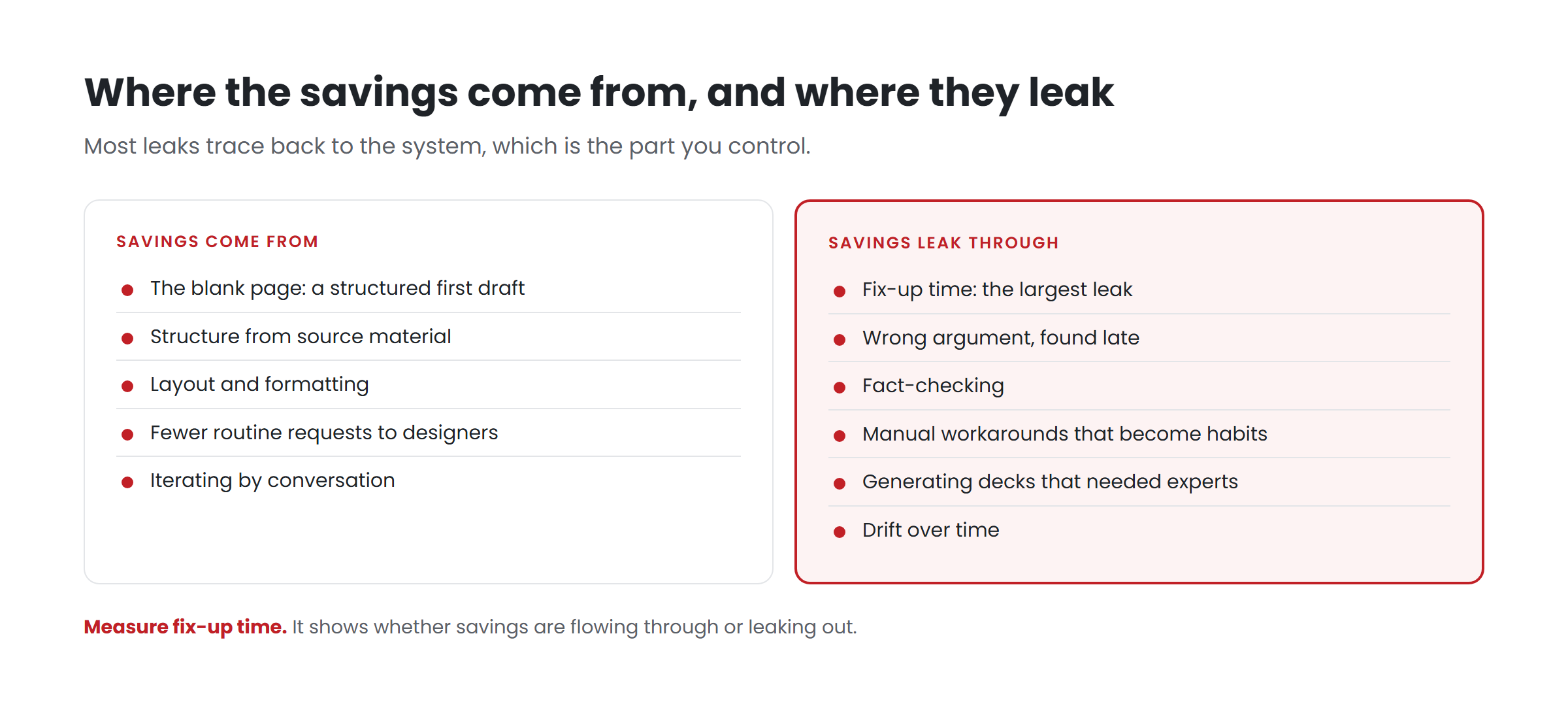
Look at the leaks together and a pattern appears. Most of them trace back to the system — the template, examples, rules and upkeep — rather than to the people or to Copilot itself. That’s good news, because the system is the part an organization controls, and a fix there applies to every future deck.
It’s also why we’d encourage anyone measuring Copilot’s value for presentations to measure fix-up time explicitly. It’s the single number that shows whether savings are flowing through or leaking out.
Key takeaways
- Savings come from the blank page, structure from sources, formatting, fewer routine design requests and faster iteration.
- They leak through fix-up time, late-discovered argument problems, fact-checking, manual workarounds, generating the wrong decks, and drift.
- Most leaks trace back to the system — template, examples, rules and upkeep — which is the part you control.
- Measure fix-up time; it tells you whether the savings are real.
Want to find your biggest leak? Have your template scored.**
Related reading
- Your template is now the ceiling on every deck your company makes
- The Copilot-ready template checklist
- Getting approved images into generated decks: Brand Kit and your asset library
Sources
- Microsoft Support, Create a new presentation with Copilot in PowerPoint (June 2026)
- Microsoft Support, Keep your presentation on-brand with Copilot (July 2026)
- Microsoft Support, Manage template settings in your Brand Kit for Copilot in PowerPoint (August 2026)
- Microsoft 365 Message Center, MC1470415 and MC1473166 (Sep 2026)