When a generated deck comes out off-brand, the natural question is “what’s wrong with Copilot?” The more useful question is “which input taught it that?”
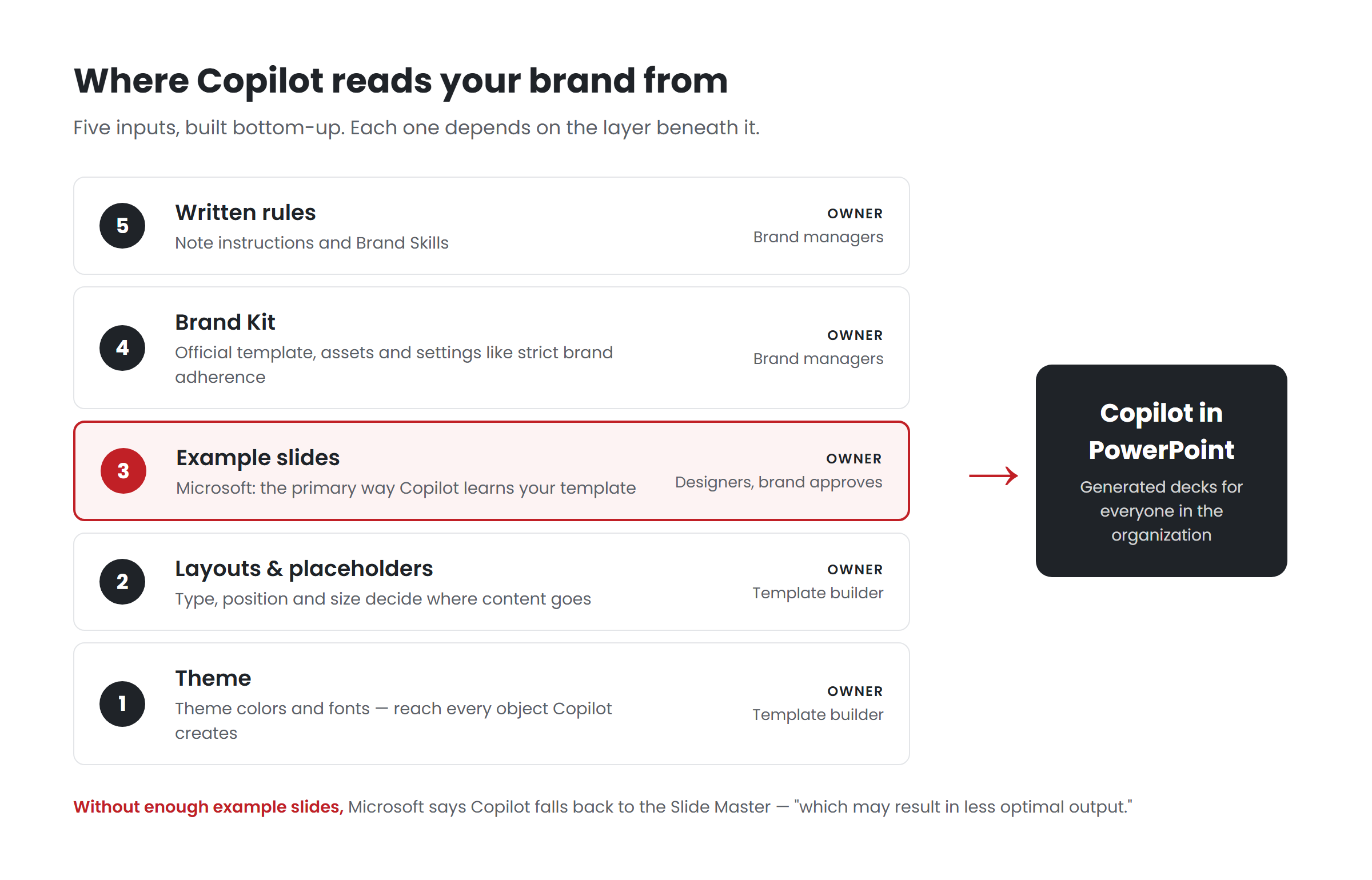
Copilot in PowerPoint doesn’t have a single “brand” setting. It assembles its idea of your brand from five different places, each controlled by different people and each responsible for a different part of the result. When something goes wrong, it almost always traces back to one of them. This post maps all five, based on Microsoft’s documentation as of September 2026.
Input 1: The theme
What it is: The theme colors and theme fonts defined in your template’s Slide Master — the palette and the heading and body typefaces.
What it controls: The color and typography of anything Copilot creates — new charts, shapes, tables and text — as well as anything in the template that references the theme.
What breaks when it’s weak: Charts in default colors. Shapes in a blue that isn’t yours. Fonts that switch mid-deck. The most common cause is hardcoded formatting: a designer painted each element by hand, so the template looks right, but the theme underneath is generic and teaches Copilot nothing. Microsoft recommends defining colors through Slide Master > Colors > Create New Theme Colors, and heading and body fonts in the theme.
Who owns it: Whoever builds the template.
Input 2: The layouts and placeholders
What it is: The Slide Master’s layouts — reusable arrangements of placeholders for titles, text, pictures, charts and tables.
What it controls: Where content goes. Microsoft’s documentation says Copilot “uses placeholder type, position, and size to determine what content should be generated and where it should appear.” It explicitly does not use the words inside a placeholder as instructions.
What breaks when it’s weak: Text overflowing a placeholder sized for a designer’s careful copy. Images cropped by decorative shapes. Content landing in a layout meant for something else, because the right layout doesn’t exist. Layouts built from drawn text boxes instead of placeholders give Copilot no structure to fill at all.
Who owns it: Whoever builds the template.
Input 3: The example slides
What it is: Finished slides inside the template that show how the brand is actually used — at different content densities and for different purposes.
What it controls: How your brand behaves: how dense your slides are, how you present data, when you use imagery, what a good agenda or comparison or timeline looks like. Microsoft describes sample slides as the main way Copilot learns, and recommends examples across typical slide intents at light, medium and heavy densities.
What breaks when it’s weak: Generic output that is technically on-brand — right colors, right logo — but looks nothing like your company’s real decks. Microsoft’s warning is specific: without enough sample slides, “Copilot falls back to the Slide Master — which may result in less optimal output.”
Who owns it: Designers, with brand approval. It’s the input templates built before Copilot were never asked to include.
Input 4: The Brand Kit
What it is: The central collection of brand assets in the Microsoft Copilot app: logos, palettes, fonts, imagery, icons, templates, voice and tone guidance, photography rules and brand guideline documents. It can draw images from your SharePoint Organization Assets Library.
What it controls: Which template and assets Copilot uses when an employee selects the brand, and — through template settings — how strictly Copilot follows the template. Strict brand adherence restricts Copilot to approved layouts; note instructions put per-slide rules in speaker notes. End users can’t override either.
What breaks when it’s weak: Several unofficial kits competing. The wrong template uploaded. Images that aren’t approved, because the asset library wasn’t connected. Strict mode switched on over a template that isn’t ready for it.
Who owns it: Designated brand managers. Only they can create or edit official kits.
Input 5: Written rules
What it is: Brand Skills — Markdown instructions published through Brand Kit, rolling out from late September 2026 — and, at slide level, note instructions.
What it controls: Behavior that isn’t visual: how presentations are structured, how titles are written, how dense slides should be, how data is sourced, which words to use and avoid.
What breaks when it’s weak: Missing rules mean Copilot applies its own defaults. Bad rules — long, vague, aspirational — dilute each other and are followed inconsistently. Untested rules give false confidence.
Who owns it: Brand managers, ideally with input from whoever owns presentation standards.
Using the map to diagnose problems
When a generated deck disappoints, match the symptom to the input:
| Symptom | Most likely input |
|---|---|
| Wrong colors or fonts on charts and shapes | 1 — Theme |
| Text overflowing, images clipped, content in the wrong slot | 2 — Layouts and placeholders |
| On-brand but generic; doesn’t look like our decks | 3 — Example slides |
| Wrong template, unapproved images, rules ignored by some users | 4 — Brand Kit |
| Wrong structure, wordy titles, missing sources | 5 — Written rules |
| Wrong argument, wrong emphasis, wrong facts | None of these — the prompt, the source, or judgment |
That last row matters. Some problems are not system problems at all, and no amount of template work will fix them. Microsoft’s own position is that generated output should be reviewed by a person.
The order to fix them in
If you are building or rebuilding, the order matters, because each input depends on the ones before it:
- Theme first, so everything built afterwards inherits it.
- Layouts and placeholders, built on the theme.
- Example slides, built on the layouts.
- Brand Kit, holding the finished template and approved assets.
- Written rules, addressing what testing shows the first four didn’t fix.
It’s tempting to do these in reverse: they start with a Brand Kit, upload the existing template, add a few rules, and wonder why the output is generic. The fix is usually further down the stack.
Key takeaways
- Copilot learns your brand from five inputs: theme, layouts and placeholders, example slides, Brand Kit and written rules.
- Each controls something different and is owned by someone different.
- Example slides are the input older templates usually lack — and the one Microsoft says Copilot learns from most.
- Diagnose problems by matching the symptom to the input, and fix from the bottom of the stack up.
Want to know which of the five is holding your output back? Have your template scored.**
Related reading
- How Copilot builds a deck from your template
- Copilot and your designers: which work belongs to whom
- What Copilot in PowerPoint still can’t do
Sources
- Microsoft Support, Keep your presentation on-brand with Copilot (July 2026)
- Microsoft Support, Create and manage official Brand kits (July 2026)
- Microsoft Support, Manage template settings in your Brand Kit for Copilot in PowerPoint (August 2026)
- Microsoft 365 Message Center, MC1473166 — Brand Skill support (16 Sep 2026)