Turn Your PowerPoint Presentation into a Video

Custom Designed Presentations

Powerpoint

PowerPoint Agency

PowerPoint Design

PowerPoint design experts

PowerPoint specialist

presentation

Presentation Agency

Presentation Company

Presentation Consultation

Presentation Designers

Presentation Firm

SlideGenius

social media

video

While a human element is naturally ideal for presentations, you don’t always have to be in the room with your audience for them to hear your pitch. Turn your PowerPoint presentation into a video, and the amount of people you’re capable of exposing your presentation to increases enormously.While your professionally designed PowerPoint is obviously a big asset during a presentation, you can further leverage it by using it as a standalone marketing tool.If you’re simply looking for a way to show people the bare-bones of the presentation in a video format, the conversion process is simple (Here’s a good How To by Microsoft).This can be useful for internal communication as well. For instance, if you’d like to share a presentation within your company, converting and sending it as a video allows others to open and view it without Microsoft PowerPoint, making it accessible on smartphones and tablets.SlideGenius can design your presentation to be a video presentation, including professional voice recording and script writing, which is obviously preferable to converting a professional PowerPoint to a video on your own. By having SlideGenius create the entire video package, you guarantee that the video has the same level of professionalism and quality as your in-person presentation.If this is a tool you plan on using to market your business with–whether you’re posting it on your website or promoting it through social media–you should make it as professional as if you were giving a presentation to potential clients or investors.

References:

4 PowerPoint Resources You Can’t Miss Out On.SlideGenius. November 20, 2013.”Turn Your Presentation into a Video.Support.office.com.

A Guide to Tackling Stage Fright

audience

Custom Designed Presentations

Fear of Public Speaking

Positive Outlook

PowerPoint Agency

PowerPoint Design

PowerPoint design experts

PowerPoint specialist

presentation

Presentation Agency

Presentation Company

Presentation Consultation

Presentation Designers

Presentation Firm

presenting

public speaking

running

stage fright

Public speaking can be intimidating, even for seasoned professionals. Stage fright, or the fear of speaking in front of an audience, affects many presenters. Whether it’s the thought of being judged, making mistakes, or simply standing in front of a crowd, stage fright can interfere with delivering your message effectively. However, with the right approach, you can overcome this anxiety and deliver a powerful presentation. Here’s a comprehensive guide to tackling stage fright and becoming a more confident speaker.

1. Prepare Thoroughly

The foundation of a successful presentation lies in preparation. When you know your material inside out, you’re less likely to stumble or lose your train of thought. Break your content into key points and rehearse them multiple times until you’re comfortable.

  • Organize Your Content: Outline the structure of your presentation clearly, with an engaging introduction, body, and conclusion.
  • Practice Out Loud: Rehearsing your speech out loud can help you hear how your ideas flow and allow you to make necessary adjustments. If possible, practice in front of a friend or record yourself.
  • Familiarize Yourself with the Venue: If you have access to the presentation space beforehand, take a walk around the stage and familiarize yourself with the setup.

2. Visualize Success

Visualization is a powerful tool that can help you conquer stage fright. Instead of focusing on what could go wrong, visualize yourself delivering a confident and engaging presentation. Picture the audience reacting positively, and imagine the sense of accomplishment you’ll feel afterward.

  • Focus on Positive Outcomes: Think about your audience being engaged and applauding your performance. Visualizing success can boost your confidence and reduce nervousness.
  • Adopt a Power Pose: Before going on stage, stand in a confident posture for a few minutes—this is known as a “power pose.” It can trick your brain into feeling more assured and in control.

3. Practice Deep Breathing

When anxiety strikes, your heart rate increases, and your breathing may become shallow. Deep breathing exercises are a quick and effective way to calm your nerves before stepping on stage.

  • Breathe Deeply: Inhale slowly through your nose for a count of four, hold for four, and then exhale for another count of four. Repeat this several times until you feel more centered.
  • Relax Your Body: As you breathe, consciously relax your muscles, especially in your shoulders and neck, where tension often accumulates. This will help you feel more grounded and composed.

4. Focus on the Message, Not Yourself

A common source of stage fright is the fear of being judged. Shift your focus away from yourself and place it on the message you’re trying to convey. Remember that the audience is there to gain something valuable from your presentation, not to scrutinize every word or gesture.

  • Shift Attention to the Audience’s Needs: Concentrate on how your presentation benefits the audience. By focusing on their needs rather than your own performance, you can divert your mind from self-consciousness.
  • Engage the Audience: Ask questions, encourage participation, or share stories to make the presentation more interactive. Engaging with the audience helps to build a connection, making the experience less daunting.

5. Start with a Strong Opening

First impressions matter. Starting your presentation confidently can set the tone for the rest of your performance. Craft an opening that grabs attention and gives you a sense of control.

  • Use a Powerful Quote or Statistic: Starting with a compelling quote, statistic, or even a short story can draw in the audience and boost your confidence from the beginning.
  • Make Eye Contact: Engage with the audience by making eye contact with a few friendly faces in the room. This will make the presentation feel more conversational and help calm your nerves.

6. Accept and Embrace Nervousness

It’s important to recognize that nervousness is a natural part of public speaking. Even experienced presenters feel anxiety before a big speech. Rather than trying to eliminate your nerves, work with them.

  • Channel Nervous Energy Positively: A certain level of anxiety can actually heighten your focus and make you more alert. Channel this energy into enthusiasm for your subject.
  • Normalize Your Feelings: Remember, many people in the audience likely experience stage fright themselves, and they will empathize with you.

7. Use Positive Affirmations

The way you talk to yourself matters. Negative thoughts like “I’ll mess up” or “They won’t like my presentation” can intensify anxiety. Replace these thoughts with positive affirmations.

  • Repeat Positive Phrases: Tell yourself things like, “I am well-prepared,” “I can do this,” or “The audience wants to hear what I have to say.” This shift in mindset can significantly reduce stress and build confidence.

8. Learn to Laugh at Mistakes

Mistakes happen to everyone. What matters is how you handle them. Instead of getting flustered, laugh off small errors and move on. Your audience is likely more forgiving than you think.

  • Don’t Dwell on It: If you stumble over a word or lose your train of thought, take a breath, smile, and continue. Chances are the audience won’t even notice.
  • Use Humor: If appropriate, self-deprecating humor can lighten the mood and show the audience that you’re human too.

9. Gather Feedback and Reflect

Once the presentation is over, gather feedback from trusted colleagues or audience members. Use their constructive criticism to improve for future presentations. The more you present, the more comfortable you’ll become.

  • Reflect on Your Successes: Take time to acknowledge what went well in your presentation. Focusing on your strengths will build your confidence for next time.
  • Embrace Continuous Improvement: Feedback is essential for growth. View each presentation as an opportunity to refine your skills and lessen your fear over time.

Final Thoughts

Stage fright may seem overwhelming, but with practice and the right techniques, it can be managed. By focusing on preparation, engaging with the audience, and maintaining a positive mindset, you can overcome anxiety and deliver presentations with confidence. Remember, every great presenter has felt fear at some point—what sets them apart is their ability to face it head-on and continue moving forward. You’ve got this!

4 Rules for Boosting Creativity for Your Presentation

Custom Designed Presentations

Follow Dr

Green Eggs Ham

John Cleese

PowerPoint Agency

PowerPoint Design

PowerPoint design experts

PowerPoint specialist

presentation

Presentation Agency

Presentation Company

Presentation Consultation

Presentation Designers

Presentation Firm

Steve Jobs

VALUABLE

VALUEBLE

It’s one thing to show a few slides with some bullet points, pictures and graphs; it’s another to give a presentation. Weird, right? That kinda’ sounds like the same thing… wrong.

Presentations are meant to inform, engage, and inspire audiences- the former does none of these things. With that, I’ll amend my original statement to this: It’s one thing to show a few slides with some bullet points, pictures and graphs, but it’s another to give a VALUABLE presentation.Valuable presentations, like most aspects of business, stem from creativity. Unfortunately there is a strong misconception about creativity in today’s society as it is commonly believed that it only comes to select group of people. The truth is that everyone has the capacity to be creative, which means everyone has the ability to create a valuable presentation. The key to being creative in your professional PowerPoint presentation comes before the actual construction of the presentation. To improve one’s conditions for innovation, one must create the appropriate setting. Here are the 4 rules to boost your creativity within your presentations:

1. You must create a space for yourself to be uninterrupted for a specific amount of time.

This is called “creative block”-  A specific starting and finishing time is necessary to effectively cultivate a “creative space.” If you have trouble focusing on getting your presentation up to the level it should be, creative blocks are the answer. Without defined times and spaces, it is too easy to drift back into dealing with the everyday stress and problems, something that will prevent you from advancing creatively and effectively. 

2. Surround yourself with soothing senses.

The sight, hearing, taste, smell, and touch in your environment will dictate your state of mind. In light of that, placing yourself in a peaceful setting, with plants, light, or soothing scent will help stir up your creative mind. In fact, studies show that the more senses your body feels at any given time, the harder your brain will work to react. The harder your brain works, the more creative your actual work becomes.


“Creativity is not a talent. It is a way of operating.”

-John Cleese


3. Cut your fat every time.

Dr. Seuss wrote Green Eggs & Ham after betting that he couldn’t produce a story using less than 50 words. The research shows that Seuss was on to something. Most people naturally take the path of “least resistance” and build off of older or existing concepts when brainstorming, which can lead to less creative ideas.Cutting the fat, or raising the bar in what you do, will allow you to produce more creative work. Follow Dr. Seuss and place restrictions on yourself while creating whatever it is you create. If you usually write two page posts, go for one page!Even Steve Jobs practiced this fat cutting principle. When the first official prototype of the iPhone 3 was created, he brought it into an engineers meeting, and dropped it into a clear box of water. He stood there and watched the bubbles from inside the device float up. He then proved to his designers that the phone could be trimmed in size based off the amount of air it released. He had the prototype made smaller and thinner, which in turn made a more appealing product. The limiting nature of any given task can bring out one’s most creative side.

4. Rethink and Renew.

Einstein once said, “If I had an hour to solve a problem, I’d spend 55 minutes thinking about the problem and five minutes thinking about solutions.” Instead of rushing into creating your presentation, it is better to visualize the problem you are working on in several angles. Most presenters think they know what their work is and how it needs to be done, but the fact of the matter is that few people actually take the time to analyze what they’re doing as being the most effective or efficient.Clearly, there is always the issue of time constraints, but just because you take longer to plan doesn’t mean you’ll take longer to finish. In fact, it is quite possible, that in taking time to thoroughly think you will find that you need less work done than you previously thought, or that the work can actually be done in more efficient ways.You don’t need to be a professional PowerPoint designer to find the best approach for your presentation. Oftentimes, the best approach is to picture the intended audience of your next presentation. Think of what inspires them. What angers them? What problems do they face? What market are they a part of?Instead of rushing to start your presentation design, spend more time thinking of what you’re even doing, why you’re doing it and what can be made better?

References:

Ciotti, Gregory. “7 Ways to Boost Your Creativity.” 99u. May 29, 2013.”Presentation Resolutions: 3 Tips to Help You Progress in 2014.SlideGenius. January 2, 2014.Reynolds, Garr. “Tips on How to Be More Creative by John Cleese.Presentation Zen. July 27, 2012.Steve Jobs: Creating an Engaging Presentation.SlideGenius. July 23, 2013.

It Doesn’t Matter, Any Tequila!

audience

Custom Designed Presentations

PowerPoint Agency

PowerPoint Design

PowerPoint design experts

PowerPoint specialist

presentation

Presentation Agency

Presentation Company

Presentation Consultation

Presentation Designers

Presentation Firm

presenting

professional presentation

Sure it’s funny, but think if it wasn’t about tequila, and instead it was about your business. You obviously wouldn’t be laughing.

If you’re looking for a house to live in, would you choose one by saying this to your realtor, “It doesn’t matter, any house?”How about when finding a spouse? Or what about when your choosing a major in college?Any semi-rational person would not. Houses, spouses, and careers are all monumental aspects to someone’s life and because of that, people tend to weigh out the pros and cons thoroughly when it comes to any decision.Much like houses, spouses and careers are huge aspects to someone’s life, the way the world identifies with your company is one of the most crucial aspects to its success. When you are presenting yourself, or more importantly your company, to an audience of buyers, sellers, investors, or whoever, it is imperative to come off as a professional, valuable, and effective entity.

Impressions you give

Most people will judge whether or not they like you, dislike you, find you interesting or boring in a matter of minutes, sometimes even seconds. These minutes are what can lead to earning or losing new clients or sales. Knowing that your presentations have this much significance, a rational person wouldn’t say “It doesn’t matter, any presentation.” In fact, they would focus on making that presentation the best it could possibly be.This is where you bring in professional presentations designers, like SlideGenius. SlideGenius is headquartered in San Diego, California with over 500 Worldwide Clients. The “Geniuses” (presentation experts) see on average over 200 presentations per month and have years of professional experience creating captivating PowerPoint presentations for a wide variety of clients.

Bringing in Professionals

The Geniuses can update an existing presentation or build one from scratch, leveraging your brand. SlideGenius works with you to ensure that the message you want to get across to your audience is communicated as effectively as possible, while leaving your audience impressed with a polished, professional presentation. If you do not have a professionally designed PowerPoint Presentation you are undeniably leaving business on the table. Many sales people have reported an increase of up to 25-50% in closed sales simply by providing a highly visual presentation.When it comes to your business, don’t take just anything. Take the best, and be the best.Work Cited:Http://www.ispot.tv/ad/7tlp/hornitos-plata-tequila-any

3 Additional Perks of Getting a PowerPoint Presentation Specialist

Custom Designed Presentations

Honda Civic

Monaco Gran Prix

Powerpoint

PowerPoint Agency

PowerPoint Design

PowerPoint design experts

PowerPoint specialist

presentation

Presentation Agency

Presentation Company

Presentation Consultation

presentation design

Presentation Designers

Presentation Firm

Presentations

SEO

As much as we hate tooting our own horn (mostly true), we want to expand on our recent post, “3 Reasons Why You Need a PowerPoint Specialist.”In the previous post, we listed a few of the reasons why our clients have found that having a professional PowerPoint design made was imperative for businesses to be perceived as professional and competent. So if you’re a business that wants to be perceived as unprofessional and incompetent, our services aren’t for you. So here are a few more reasons why you can’t afford to skimp on presentation design.

Build Confidence in Your Audience, Yourself

Would you rather show up to the Monaco Gran Prix in a MacLaren F1 or that dinky Honda Civic you drove in high school? It wouldn’t matter if you were the best driver that’s ever been behind the wheel, you’re not going to fare well with a hunk of junk car.It often doesn’t matter how excellent a presenter or public speaker you are, if you show up with an amateur presentation, your presentation ability won’t be evident, and your presentation won’t impress anyone. In order for your audience–whether that be investors, potential clients or employers–to have confidence in you, your professionalism and capability need to be apparent.

Make the Sell

A professionally designed presentation is an expense, but more importantly, it’s an investment.Our promise to clients, “We design presentations that sell,” is just that: A promise. The increase in business our clients experienced after deciding to show up to important presentations with a professionally designed presentation caused them to continue to employ our services.

More Efficient Allocation of Resources

We’re better than you are at designing PowerPoint presentations. We’re sure you’re better at doing whatever it is your business does too. Outsourcing can be a valuable tool in employing outside expertise when it comes to specialized services.Many remain skeptical about outsourced services, fearing the hidden costs and lack of transparency, but we’ll walk you through every step of our process here at SlideGenius, so you know exactly what you’re paying for.Allowing clients to see our process in action lets them realize the number of man hours they save by outsourcing their presentation design to us, thus being able to spend time on the business they do best, or on preparing for the oral portion of their presentation while we focus on the visual aspect. 

Reference:

3 Reasons Why You Need a PowerPoint Presentation Specialist.SlideGenius. August 1, 2013.

How to Survive Through Shark Tank

Custom Designed Presentations

Every Friday

Focus

Joe Shmo

Mark Cuban

PowerPoint Agency

PowerPoint Design

PowerPoint design experts

PowerPoint specialist

presentation

Presentation Agency

Presentation Company

Presentation Consultation

Presentation Designers

Presentation Firm

Shark Tank

Tod Pie Factory

My name is Joe Shmo and I would like $100,000 for a 10% stake in my company.

Every Friday night, about 7 million Americans seem to hear that phrase, or some almost-identical derivative of it, in the prime-time feeding frenzy, Shark Tank.Rolling into its fifth season, the eminent television series attracts promising startups to pitch their business venture to a 5-person panel of highly successful entrepreneurs (potential investors) to be ruthlessly chewed up by the panelists’ multitude of interrogative questions.As of December of last year, at the closing of its latest season, the show’s panel members had invested “$12.4 million in the business opportunities.” During that same 2012 season, more than 36,000 people applied to become contestants on the show.The 5th season’s panel will include highly successful venture capitalist Kevin O’Leary, billionaire Dallas Mavericks owner Mark Cuban, co-founder of the Paul Mitchell and The Patron Spirits Company John Paul Dejoria, and other business magnates sitting in as the Sharks. You never know whether the pitch will go totally right or deliciously wrong. After four drama-filled seasons, we have gathered two unique and effective rules to present by when it comes to surviving the Shark Tank.

Focus on the facts and figures

This is the single most important rule to follow when pitching your professional PowerPoint presentation. Your investor will primarily focus on what costs and sales you had, have, and think you’ll have– which mean you should too. Whether you’re pitching to investors or presenting to grow your business, it’s vital that you understand your business’s cash flow. Passion and motivation are great for business, but they only get you so far, as we’ve learned from many of the Sharks; numbers tell the real story.

What’s your story?

This is the essential question you need to have answered before beginning your presentation. Aside from the numbers, the one thing sharks focus on most is you and what better ways to show who you are than through your story. Your story is basically the long, twisted, and rocky road you took to get to where you are now. Speaking frankly, people eat these emotional stories up. What human can’t relate to hardship? We are all programmed to empathize to emotions, both good and bad ones. As long as you don’t overdo it, you can utilize the story to reel your sharks in.Along with your story comes the “sub-rule” to be personable. While all of the above will get you closer to your dream of running a successful business, it also helps to have a winning personality. No one wants to do business with someone who is unlikable, except maybe Mr. Wonderful. As Shark Barbara Corcoran said in a recent tweet, “All the entrepreneurs I’ve invested in have amazing personalities—no regrets.”

Be clear, precise, and confident

This is the last rule we have to share. Much like your sharks will focus on numbers and personality, effective communication is the third and last key component to survival. You need to speak simply, and confidently. This will show your sharks you mean business and that you understand your business. Don’t come across cocky. Once you rub the sharks the wrong way, tension will take over, which would screw up any prospect of dealing with one another. Think before you speak, and don’t act impetuously. Once your shark comments and asks a question, take a breath, and then respond. Acting out too quickly may draw blood. This is true for any investor presentation or professional PowerPoint.If you’re going to swim with the sharks be prepared. Use these rules for your next professional PowerPoint design!READ MORE: 7 Entrepreneurial Lessons from “Shark Tank” – Fast Company

Public Speaking Lessons to Take Away from “The King’s Speech”

audience

Colin Firth

Custom Designed Presentations

Fear of Public Speaking

Lionel Logue

PowerPoint Agency

PowerPoint Design

PowerPoint design experts

PowerPoint specialist

presentation

Presentation Agency

Presentation Company

Presentation Consultation

Presentation Designers

Presentation Firm

Presentations

public speaking

running

The King's Speech

Released to huge acclaim from audiences and critics in 2011, The King’s Speech details King George VI’s struggle to overcome his stammer and fear of public speaking, and his relationship with his unconventional speech therapist Lionel Logue.While it’s a very captivating movie, it also has a lot of practical application as a guide to public speaking, and there are many lessons to learn from the challenges King George VI overcame during his journey in becoming an effective public speaker.

Confidence is Key

The primary struggle of The King’s Speech is King George VI’s struggle to learn to trust his voice. Throughout the film, he learned to become comfortable in his own skin and accept his faults, which translated to overcoming his stutter.Confidence is imperative to giving an effective presentation, especially during an investor or interview presentation where instilling confidence in one’s audience is a must. It’s difficult to fake sincere confidence, which emanates throughout your presentation in a variety of ways, but if you can’t find confidence in your ability to speak in public, a good substitute is to reassure yourself with confidence for what you’re presenting.During the film, a primary reason “Bertie” developed his stammer and fear of public speaking was because he got caught in a cycle of negative reinforcement, where previous public speaking failures caused him to lose confidence in himself, and resulted in him continuing to give poor speeches because of it. After a bad presentation, it’s important to learn from your mistakes, then forget about the bad performance and move forward.

Realize There is Room for Improvement

Chances are you’re not the greatest presenter or public speaker on the planet. There is always room for improvement. However, for those who struggle with public speaking, the greater challenge isn’t realizing you have a problem, but openly addressing it.Whether you seek to improve your public speaking privately, with a college course or elsewhere, the most important factor is that you are addressing the fact that public speaking is a challenge for you. Running and hiding from it will do nothing but make the problem worse.One of my favorite moments in The King’s Speech was the conversation between “Bertie” and his speech therapist when he admitted he needed help:”Lionel Logue: What was your earliest memory?King George VI: I’m not… -here to discuss… -personal matters.Lionel Logue: Why are you here then?King George VI: Because I bloody well stammer!”

Practice

Every great presenter, especially those whose skill appears to be effortless and relaxed, became great through practice and repetition.In Malcolm Gladwell’s popular book, “Outliers,” he presents the “10-hour rule” as the reason for success behind Bill Gates’ wealth and business success and the enormous popularity of the Beatles. He theorizes that these two entities had approximately 10,000 hours of exposure to their craft, which is what made them become so legendary.Practice and experience produces success. Great presentations aren’t improvised. If you want to “wow” an audience, you have to put in the work.Rehearse your presentation until it’s ingrained in your memory–to the point of monotony. Orchestrate your talking points with your visual aid.

Check out ‘The King’s Speech’ if you haven’t seen it yet. It’s a captivating film where you can find lessons ingrained within the challenges overcome by this tongue-tied monarch.

The Need for Data Visualization in Presentations

Custom Designed Presentations

data

Data Visualization

PowerPoint Agency

PowerPoint Design

PowerPoint design experts

PowerPoint specialist

presentation

Presentation Agency

Presentation Company

Presentation Consultation

Presentation Designers

Presentation Firm

professional presentation

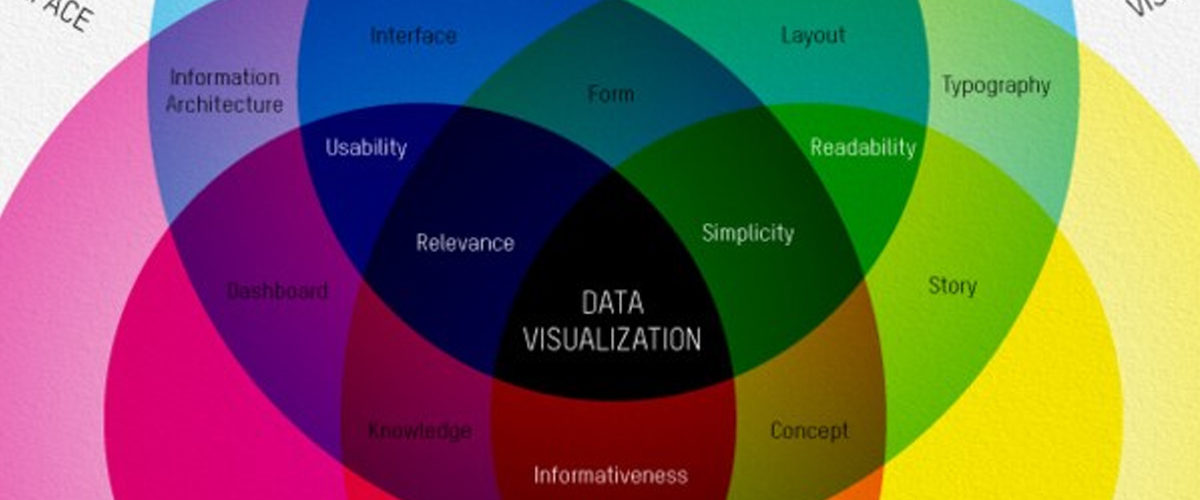
In today’s information-driven world, data plays a crucial role in decision-making. However, raw data alone can overwhelm or confuse an audience, especially during presentations. Data visualization is the solution. It transforms complex data sets into visual formats that are easier to understand, interpret, and act upon. Charts, graphs, infographics, and maps make large amounts of information digestible, enabling you to convey key insights quickly and effectively.Here’s why data visualization is essential in presentations:


1. Simplifies Complex Information

Raw data can be intimidating, especially in large quantities. Data visualization helps simplify complex information, allowing the audience to grasp key points without having to sift through numbers.Why It’s Important:

  • Improves Understanding: Visual representations of data are easier to interpret, making complex information more accessible.
  • Clarifies Patterns: Charts and graphs can reveal trends, correlations, and outliers that might be missed in raw data.

Example: Instead of showing a spreadsheet filled with sales data, a line graph can illustrate the upward trend in sales over the last year, making it easier for your audience to spot patterns.


2. Engages Your Audience

Presenting data in a visual format helps break up text-heavy slides and keeps your audience engaged. Visuals are more stimulating than rows of numbers and can capture attention more effectively.Why It’s Important:

  • Enhances Engagement: Visuals are processed faster by the brain than text, keeping your audience more focused and attentive.
  • Increases Retention: People are more likely to remember information presented visually than through text or spoken word alone.

Example: Using a pie chart to show market share distribution among competitors grabs attention more effectively than listing percentages in bullet points.


3. Highlights Key Insights

Data visualization helps presenters emphasize the most important data points and insights. By visually highlighting trends or critical metrics, you can guide your audience’s attention to the key takeaways.Why It’s Important:

  • Focuses Attention: Visuals direct the audience to the most significant data points without requiring them to sift through irrelevant information.
  • Increases Persuasiveness: Well-designed visuals can strengthen your argument by making data more compelling and easier to understand.

Example: A bar chart comparing the revenue growth of two products can make it obvious which product is performing better, allowing the audience to quickly grasp the comparison.


4. Makes Data More Persuasive

Numbers can be powerful, but they are even more impactful when presented visually. Data visualization allows you to build a more convincing narrative by backing up your points with clear, compelling data.Why It’s Important:

  • Builds Credibility: Visualizing data makes your information look more professional and trustworthy.
  • Increases Persuasion: Seeing data in a chart or graph format can make your argument more convincing to the audience.

Example: Showing a decline in customer complaints via a line graph over time reinforces the success of a customer service initiative.


5. Saves Time

Data visualization allows you to communicate more information in less time. Instead of explaining data point by point, a chart or graph can instantly convey key trends or comparisons, making your presentation more efficient.Why It’s Important:

  • Increases Efficiency: Visuals convey a lot of information at a glance, saving time for both you and your audience.
  • Improves Focus: You can present the core insights without overwhelming your audience with data overload.

Example: A heatmap showing regional sales performance allows the audience to instantly see which areas are underperforming without the need for lengthy explanations.


Final Thoughts

Data visualization is essential for making your presentation clear, engaging, and persuasive. It simplifies complex information, grabs attention, highlights key insights, and saves time for both presenters and audiences. Whether you’re presenting financial reports, marketing metrics, or operational data, using visual aids like graphs and charts will help you deliver your message effectively.


The Do’s and Don’ts of Slide Design

Slide design plays a critical role in the success of any presentation. Well-designed slides enhance your message, making your content more engaging and easier to understand. However, poor slide design can confuse or distract your audience, taking away from the effectiveness of your presentation. To ensure that your slides are helping, not hindering, your message, it’s important to follow a few key design principles.


Why You Need Props at Your Next Presentation

audience

Custom Designed Presentations

Italy

Marco Montemagno

metaphors

PowerPoint Agency

PowerPoint Design

PowerPoint design experts

PowerPoint specialist

presentation

Presentation Agency

Presentation Company

Presentation Consultation

Presentation Designers

Presentation Firm

Presentations

props

Props in Presentations

When you hear the word “prop” do you think of those cotton horse heads on a stick that the actors pretend to ride around on?The truth is props are universally profiled as cheesy theatrical objects, much like the horse on a stick, good only for middle-school plays. Because of this, props are obsolete in the eyes of the typical presenter, and that’s a problem.While by definition, the word “prop” does refer to theatrical property, its purpose is overlooked. Any given prop is used to add realism to a given story and to help advance the narrative in a more palpable way. This idea is directly transferable and applicable to any corporate presentation, PowerPoint presentation, or sales pitch.By thinking of props as relics of the past, we are blinding ourselves of the many creative and effective ways to utilize props in today’s world.Here’s my favorite example:

Italian entrepreneur and television host Marco Montemagno is the renowned founder of digital domination summit.Digital Domination Summit is a free online event, featuring prerecorded video messages & video interviews from up to 30 leading authorities on how to do business in the digital world”. Montemagno’s also hosts live talks that are are known to be among the most engaging and intriguing throughout of Italy and Europe for that matter. He focuses on the topic of Internet culture. His talks revolve around showing Italians why the Internet should be embraced and not feared. Montemagno presents to audiences of up to 3,000 people in cities including Milan, Rome, and Venice. In spite of his goal to bridge a divide between his technical expertise and the everyday language of his audience, Montemagno uses devices meant to engage his listeners, namely props.

Montemagno’s audience members get a pen and paper before taking their seats. During the presentation, he asks them to turn to the person to their right and in 30 seconds sketch their portrait. He then asks them to write the title of their favorite song, movie, etc. They pass the paper around and repeat the process until the paper has changed hands up to five times. Each audience member then takes home a piece of paper that once belonged to someone else. The exercise is intended to demonstrate how information is shared among individuals across networks.

Montemagno shows us a unique and creative medium through which to apply props. He takes a complex subject, and simplifies to an experience that every member of the audience can feel, and therefore remember vividly. This is what props are useful for, helping the audience feel, understand, and remember. If you manage to get your audience to go through these three sensations about  you and your PowerPoint presentation, you will find your business reaching new heights!

3 Reasons Why You’ll Benefit from Using Props:

 Your presentations will be more memorable. Sure, you can repeat the same description of your product 12 times, and increase audience retention, or you can just bring out the actual product, explain it once, and get the same effect.You can apply them as effective metaphors. Using props as metaphors are great way to get your audience’s attention in a matter of a few seconds.You will create emotional impact. While facts and stats will tell, emotion will sell!

References:

“Digital Domination Summit 2013.” Wired UK. June 28, 2013.Gallo, Carmine. “Using Props to Improve Your Presentations.” Bloomberg.com. January 27, 2009.”How Do Props Help a Presentation?” Manner of Speaking. September 25, 2011.”Putting Your Presentation before Your PowerPoint.SlideGenius. December 9, 2013.”Ten Tips for Using Props in a Presentation.Manner of Speaking. September 28, 2011.

3 Reasons Why You Need a PowerPoint Presentation Specialist

audience

Brand Recognition

corporate presentation

Custom Designed Presentations

Memorable Impact

Powerpoint

PowerPoint Agency

PowerPoint Design

PowerPoint design experts

PowerPoint specialist

presentation

Presentation Agency

Presentation Company

Presentation Consultation

presentation design

Presentation Designers

Presentation Firm

presentation specialist

In an age where computers and technology are rapidly becoming more and more user friendly, it’s common for people to adapt a do-it-yourself mindset when it comes to PowerPoint presentations. Sure, covering the basics of throwing together a PowerPoint is something anyone can do, but to do it well and effectively–that takes expertise.Here are three of our favorite reasons why leaving your presentation design to the experts is not only preferred, it’s imperative to your and your company’s success.Consistency and Brand Recognition

An example of a creative, engaging slide by SlideGenius.Many large sales companies allow their sales associates to have a good amount of free reign during corporate sales presentations, but this often includes letting these sales people craft and present their own PowerPoint presentations, which can often lead to lack of synergy and a muddled corporate identity.With a unified, clearly discernible PowerPoint, your company can present itself in a consistently professional manner, avoid ambiguity in your sales strategy, and allow for creativity in the field within a controlled context. It also sets the standard of excellence for presentations throughout the company.Make a Memorable ImpactSadly, many are okay skimping by with just an adequate presentation, but there’s a world of difference between a passable presentation and one that’s going to make an impression, and ingrain what you have to say into your audience’s memory.A great presentation, one designed by the specialists who do it for a living, is a carefully crafted narrative accompanied by graphic designs that visualize your message in a way that’s easily digestible and highly impactful.We all know the moments where we need to present at the top of our game, and unless you happen to be an expert PowerPoint designer, that wont happen if you show up with a home-made presentation.Exemplify Your SkillsA PowerPoint presentation is a visual aid. It’s an element in your presentation; it’s not a presentation in itself. You, or whoever it is that will be presenting, should always be the key component in the presentation. However, without a strong visual representation of your message, all the passion and clarity will be diminished.Furthermore, a presentation that doesn’t show creativity, passion, and competency can have a serious correlation to how your entire business is perceived. You might be a computer programming company, a lackluster presentation will still reflect poorly on your ability to do the job, whatever that job may be. Show that you are a competent, professional company in all aspects, and confidence in all aspects of your work will follow.